
01
Set up a folder
One command, or a few clicks in the app. Entry files point every AI tool at the same rules.
$ npx aizbrain init
+ .ai/INSTRUCTIONS.md
+ .ai/INDEX.md
+ CLAUDE.md  AGENTS.md
+ GEMINI.md  QWEN.md
Claude hits its limit halfway through? Open Codex in the same folder and ask where things stand. Your tasks, context and AI handoffs live in plain Markdown on your computer, so the next model picks up where the last one stopped.
Windows and macOS · MIT license
AI didn’t get worse when you switched. It just can’t see what you told the last one.
One command, or a few clicks in the app. Entry files point every AI tool at the same rules.
$ npx aizbrain init + .ai/INSTRUCTIONS.md + .ai/INDEX.md + CLAUDE.md AGENTS.md + GEMINI.md QWEN.md
At session start, a hook hands the AI today’s most important task and the recent handoffs.
# .ai/INDEX.md
Most important today (P1):
Finish the launch post

Recent AI handoffs
Claude Code → next: tighten intro
When an AI edits your folder but forgets the log, the hook reminds it once. The next AI reads it.
### AI work log (Claude Code)
- Done: drafted the launch post
- Result: Knowledge/Launch post.md
- Next: tighten the intro
Hook-based tools get context automatically. Tools with rule files read the same instructions when they open the folder.
For people with a lot on their plate. These are real screens from the app, with made-up data.
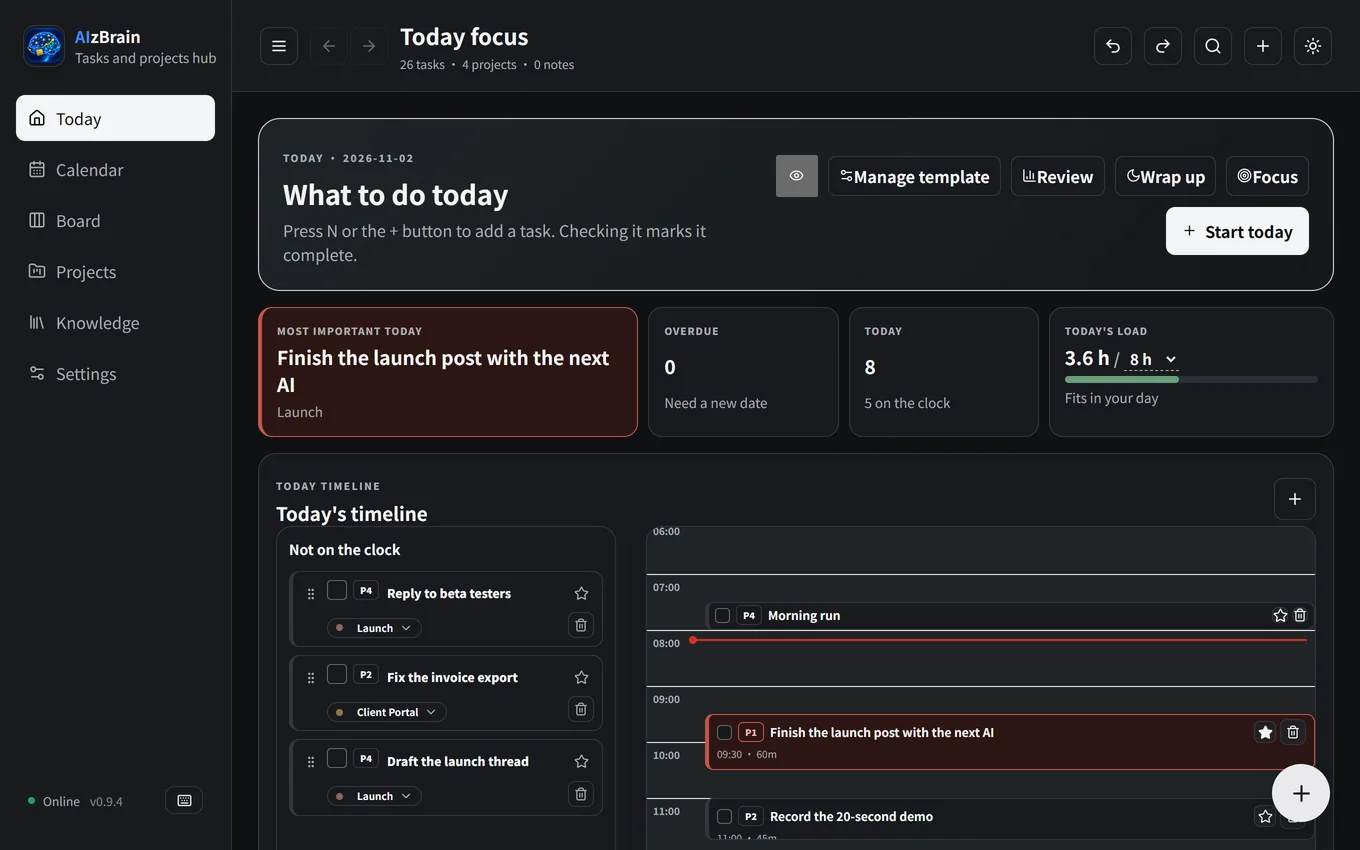
One most important task, a timeline, and a warning when today holds more hours than you have.
Type “Pay the phone bill tomorrow at 3pm”. The date and time are recognized.
One task at a time, with a timer.
Move what’s left to tomorrow in one click and see what you finished.
Follow up on work you handed off, on the day it’s due.
Send a task from your phone. It reaches your computer end-to-end encrypted.
Tasks finished and the projects that moved most, up to 12 weeks back.
- [ ] #task Write the first tutorial
      [[Open Source Launch]] ⏳ 2026-08-15 ⏰ 09:30

  ## Notes
  Full Markdown content for this task.

  ### AI work log (Codex)
  - Next: read it through once more
“I pay for Claude, ChatGPT, Gemini and Grok. Each has been the best at some point, and you never know which will be next.”
“Switching meant explaining everything again. So I built this for myself: the models can change, but my workflow stays on my computer.”
Anything that runs on your computer is free. The one paid feature is hosted, which is why it costs money.
| Feature | Price |
|---|---|
| Desktop app: tasks, calendar, board, projects, knowledge | Free |
| AI handoff, CLI, hooks and MCP server | Free |
| Phone inbox: send tasks to your computer, encrypted | Free |
| Phone today’s list: see and tick off tasks on your phone | Paid members |
The paid list is included in the author’s Skool community membership. It sends an encrypted snapshot of your upcoming tasks that the relay can’t read. The source is public like everything else.
Windows shows this for new apps without a paid code-signing certificate. Click More info, then Run anyway; you only see it on first install. On a Mac, use System Settings → Privacy & Security → Open Anyway. Updates are checked against a public key built into the app, and all the source code is on GitHub.
No. npx aizbrain init sets up a folder with Node.js alone. The app adds the calendar, board, notifications and phone inbox on the same files.
No, a web chat can’t see files on your computer. Use a tool that can, such as Codex, Claude Code or Gemini CLI, or connect a client through the MCP server.
No. Hooks read only your folder, never the conversation. Your AI provider’s own privacy terms still apply to whatever that tool reads.
Yes. Repeat rules and similar tokens follow Obsidian Tasks, and the same folder can be open in both.
Free, no account, and your files stay yours.
Prefer the terminal? npx aizbrain init